How Does the Greenlight Debit Card Work?

How Does the Greenlight Debit Card Work? A Complete Parent’s Guide
When I first heard about the Greenlight debit card, I assumed it was just another prepaid card for kids. I was completely wrong and the difference matters if you’re a parent trying to teach your children real money skills.
So how does the Greenlight debit card work, exactly? It’s a family finance app paired with a physical Mastercard debit card built specifically for children. Here’s what surprised me most: Greenlight isn’t a bank itself. It partners with Community Federal Savings Bank—a federal savings bank member of the FDIC—to offer FDIC-insured deposits up to $250,000, which immediately removed my biggest concern about trusting a fintech app with my family’s money.
Here’s how it works in practice: I load money into my child’s account, decide which stores they can spend at, and set the limits. My kids get genuine spending freedom within boundaries I define. That balance is what convinced me this was worth trying.
Unlike a regular prepaid card you load and forget, Greenlight sits between full parental lockdown and complete independence. The feature that actually changed things for me: real-time visibility. I see every transaction my kids make the moment it happens not buried in a monthly statement three weeks later.
Who Is Greenlight Built For?
Greenlight works for kids from elementary school age through college, adjusting features as they mature and become more financially ready. For families with multiple children, one account covers up to five kids and two adults a genuine simplification compared to juggling separate accounts at different banks.
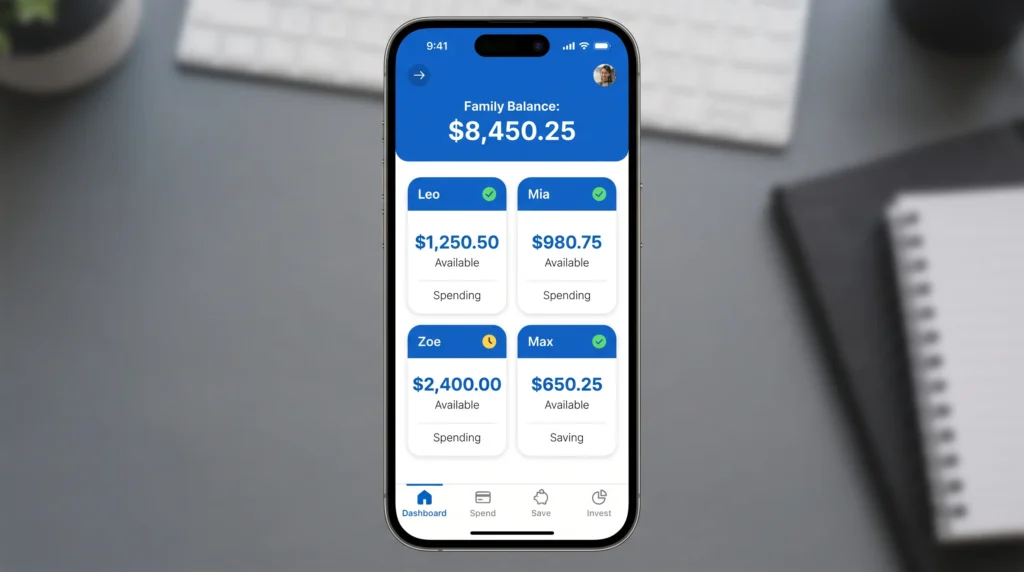
Greenlight launched in 2017 and now serves over 6 million families (per Greenlight’s own reported figures). That’s not a niche product finding a small audience that’s a signal that a lot of parents are actively looking for something better than handing their kids cash and hoping for the best.
Understanding why parents adopted Greenlight revealed the core problem the platform solves: cash management. My kids would lose physical money, forget where they’d spent it, and have zero visibility into their savings. Tracking paper currency felt nearly impossible without constant parental oversight.
Greenlight solved the specific problem cash created: money would disappear and neither my kids nor I could explain where it went. Once everything moved into the app, my kids could see their own balance. I could see their spending. And for the first time, when they made a poor choice, we could actually talk about it with real numbers in front of us.
The platform isn’t perfect for everyone, but knowing what the Greenlight debit card actually is versus what I assumed it was helped me make a smarter decision about whether it fit my family’s needs.
How Greenlight Differs from a Regular Debit Card
Traditional debit cards attached to checking accounts work the same way they always have: you swipe, money moves, and you get a statement at the end of the month. Basic fraud protection is about all most youth accounts offer parents beyond that.
Greenlight flips this completely. Instead of passive access with minimal oversight, you’re in the loop on every transaction as it happens and you set the rules before your kids ever reach the checkout.
The difference shows up in four specific ways I noticed immediately.
The controls go deeper than basic spending caps. You can block entire categories gas stations, restaurants, online retailers — directly from the app. When my son tried to buy a game online in a blocked category, the card just declined. No drama, no call to the bank.
The notifications are instant, not delayed. The moment either of my kids swipes their card, I see the merchant name, amount, and time. Not in a monthly statement right then.
The chore connection is built in. I assign tasks, set dollar values, and payments process automatically when tasks are marked complete. This replaced our old system of me forgetting to pay and my kids forgetting to remind me.
The savings feature is visual, not just numerical. My kids set a goal a video game, a bike and watch a progress bar fill up. That visual feedback drives saving behaviour in a way that a balance number on a screen never did.
The platform adapts to changing developmental stages in ways traditional accounts don’t. At age seven, I disabled ATM access, restricted online purchases, and required parental approval for any transaction over $5. By age fifteen, my teenager had unlimited ATM access, unrestricted merchant categories, and the ability to initiate trades (pending my approval) through the investing feature. This scalability the ability to increase autonomy while maintaining visibility is what distinguishes Greenlight from static traditional accounts designed for a single control level.
A regular debit card gives access to money. Greenlight gives access plus structure, education, and real-time management. That’s the difference I noticed right away.
Setting Up Greenlight: What Happens After You Sign Up
Setup was faster than I expected. Creating the parent account takes about five minutes — email, password, legal name, done. Then you add each child individually, entering their name and age so you can set different controls for each one. My ten-year-old and my fifteen-year-old have completely different settings, which is the whole point.
The funding step comes last. You link a bank account as your primary funding source for transfers to your child’s spending categories and savings goals. Greenlight also supports direct deposit, enabling teenagers to receive employment income directly into their accounts without parent-to-child transfers.
Waiting for the Physical Cards
Cards take 7 to 10 business days to arrive after you complete setup. When mine showed up, I was genuinely surprised by how solid they felt real Mastercard branding issued by Community Federal Savings Bank, not the flimsy plastic you’d expect from a kids’ product. My kids immediately treated them like actual bank cards, which matters more than you’d think.
Each card comes with a unique PIN for ATM access (which you control through the app), and activation requires simply entering the card details into the Greenlight app. Within minutes, the card becomes functional for spending at any Mastercard-enabled merchant.
Custom Card Designs That Kids Actually Care About
You can personalize each card with a custom photo or artwork your child designs. When my daughter put her own photo on her card, she became noticeably more careful with it. My son designed his own artwork and started treating it like something he’d actually worked for — not just a piece of plastic I handed him. Small thing, real difference.
Children who feel genuine ownership over their cards demonstrate greater care in how they use them less casual spending, more intentional purchase decisions, fewer “lost cards” incidents. What appears to be cosmetic customization functions as a behavioural accountability tool.
The Referral Program Bonus
Greenlight also has a referral program: if you invite a friend who signs up, you both get $10. Worth mentioning if you know other parents who are already looking at this.
The app walks you through everything in plain language. If you’ve never used a fintech product before, that’s fine I hadn’t either, and I didn’t hit a single confusing step during setup.
How Greenlight Works for Parents: The Controls Most People Don’t Realize Exist
Most parents assume Greenlight is simply a debit card with spending caps. The reality is far more sophisticated: the parent dashboard provides granular spending controls that exceed anything traditional banking institutions offer for youth accounts.
Understanding how these controls work requires examining several distinct mechanisms, each of which operates independently to give parents different types of oversight.
The Parent Wallet: Why Money Doesn’t Go Straight to Your Kid
The Parent Wallet is what separates Greenlight from a regular debit card setup. Money you deposit doesn’t go straight to your kid. It lands in a parent-controlled area the Parent Wallet that only you can see and access. From there, you decide where it goes.
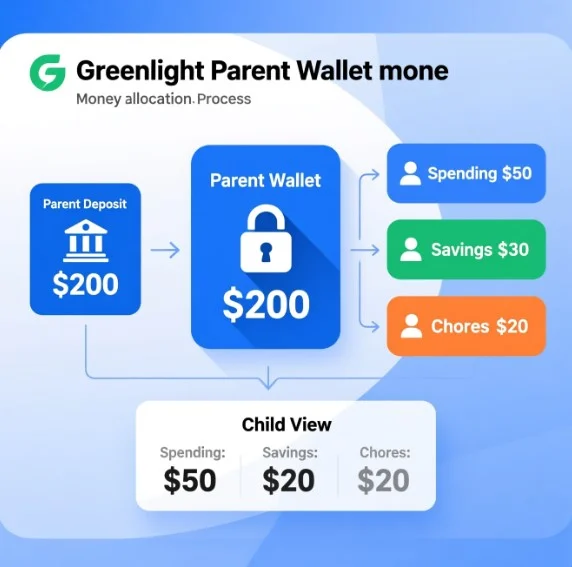
Instead of handing your kid $100 and hoping they don’t blow it in one afternoon, you deposit $100 to the Parent Wallet and then choose exactly where it goes. Twenty dollars to your daughter’s spending. Fifteen to your son’s savings goal. The rest you hold until you decide. Every dollar has a direction before your kids ever see it.
The teaching moment here is real: your kids quickly learn that money doesn’t just appear. Every dollar they get was a decision you made which opens up genuine conversations about why you chose to fund one thing over another.
If your daughter needs unexpected funds while shopping, you can transfer money from your Parent Wallet to her account in seconds giving you responsive flexibility without relinquishing control.
Additionally, the Parent Wallet prevents the common problem of over-funding youth accounts. You’re not depositing the month’s entire allowance upfront and hoping children self-regulate spending. Instead, you release money systematically, maintaining oversight and the ability to pause transfers if circumstances warrant.
Store-by-Store Spending Controls (More Powerful Than You Think)
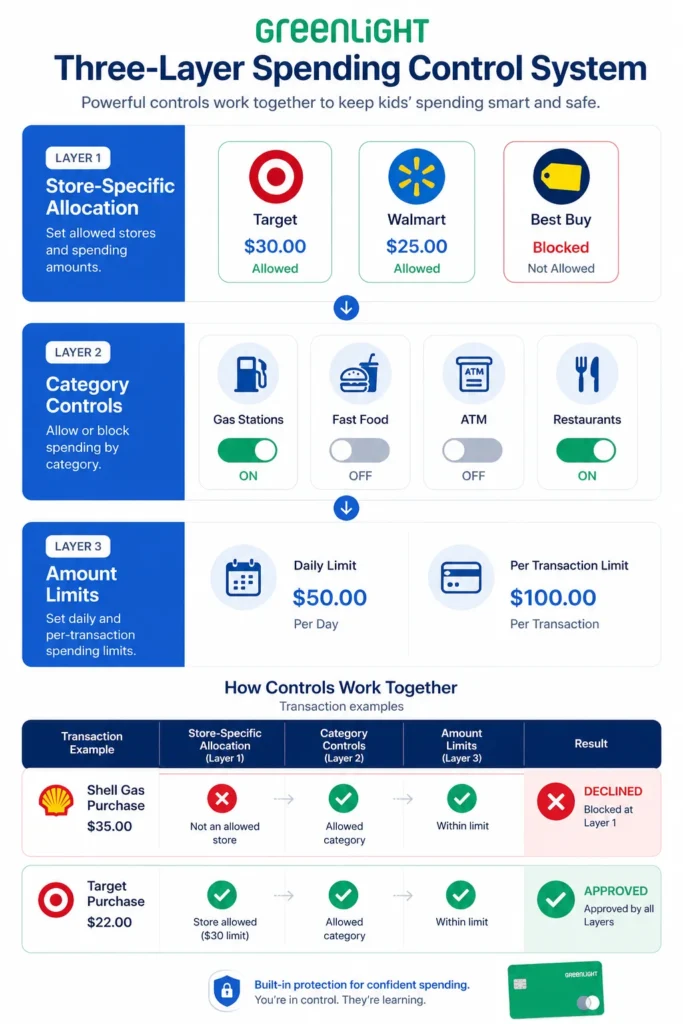
Greenlight enables two distinct types of spending restrictions: store-specific allocation and category-level blocking. These mechanisms work independently to create multiple layers of spending oversight.
Store-Specific Allocation
Rather than broad category spending, you can designate funds for specific merchants. For back-to-school shopping, you might allocate $30 to Target, $25 to Walmart, and $20 to Staples. Your child can only spend allocated funds at those specific stores; transactions decline if they attempt to purchase elsewhere.
The ‘I spent it somewhere else’ problem solved. Unspent funds automatically return to your Parent Wallet. If your son had $30 for Target and spent $22, that remaining $8 comes back to you. He can’t redirect it, hold onto it, or quietly spend it elsewhere.
Category-Level Controls
Beyond store-specific allocation, you can block entire spending categories: Any ATM, Any Gas Station, Any Restaurant. These toggle on and off, so you can enable ATM access for a school trip and turn it off again when they’re back home.
Your teenager might have ATM access blocked normally but you enable it temporarily for a school field trip, then disable it again upon return home. This selective access approach maintains security while providing contextual flexibility.
You can combine these mechanisms for comprehensive coverage: restrict your child to specific grocery stores via store allocation while simultaneously blocking All Fast Food restaurants through category controls. The card simply cannot function outside parameters you’ve established.
Real-Time Monitoring and Instant Control
Greenlight delivers real-time transaction notifications rather than delayed reporting. The moment your child makes a purchase whether at a physical store, online, or through a digital wallet you get a notification with the merchant name, amount, date, and time. This immediate visibility enables responsive intervention if needed.
Card Freeze Capability
If you identify a transaction you didn’t approve, the card can be frozen instantly through the app—a response that takes less than 10 seconds. This is dramatically faster than traditional bank debit cards, which require phone calls and waiting for fraud departments to process requests. If a card is lost or stolen, disabling it immediately through the app prevents further use.
Approval Authority
You maintain the final decision-making authority on certain transaction types. While you can’t approve individual purchases in real time (most transactions process automatically), you can establish spending parameters that function as a pre-approval system: specific stores only, specific categories only, dollar amount limits, etc.
Dashboard Visibility
Put these together instant notifications, card freeze, store restrictions, and a central parent dashboard and you have a level of oversight that no traditional youth bank account comes close to matching.
Chores, Commissions, and How Kids Actually Earn Money on Greenlight
Greenlight’s chore system starts with a choice: do your kids get their allowance regardless of whether chores are done, or do they only earn it when the work is finished? That one decision reflects a lot about your household rules and both approaches are valid.
The commission approach mirrors real employment: finish the work, receive the pay. You set a base amount for weekly household tasks and can add extra one-time projects like yard work. The lesson is straightforward effort produces income.
Greenlight’s chore tracking system enables children to mark tasks complete in their own app interface, while parents see real-time completion status. If tasks remain incomplete by a deadline (like Sunday night), you can pause the weekly payout until work is finished. This pause mechanism creates immediate consequence without permanent punishment: children understand that payment resumes once tasks are completed.
The pause feature is particularly effective for preventing indefinite procrastination because it links compensation directly to completion without harsh all-or-nothing consequences. A child who procrastinates three tasks until Tuesday can still earn their allowance once those tasks are done, just with a temporary delay in payment.
The Three Chore Payout Models (Which One Fits Your Family?)
Greenlight gives you three ways to handle allowance management, and the one you pick really depends on your child’s age and what you’re trying to teach.
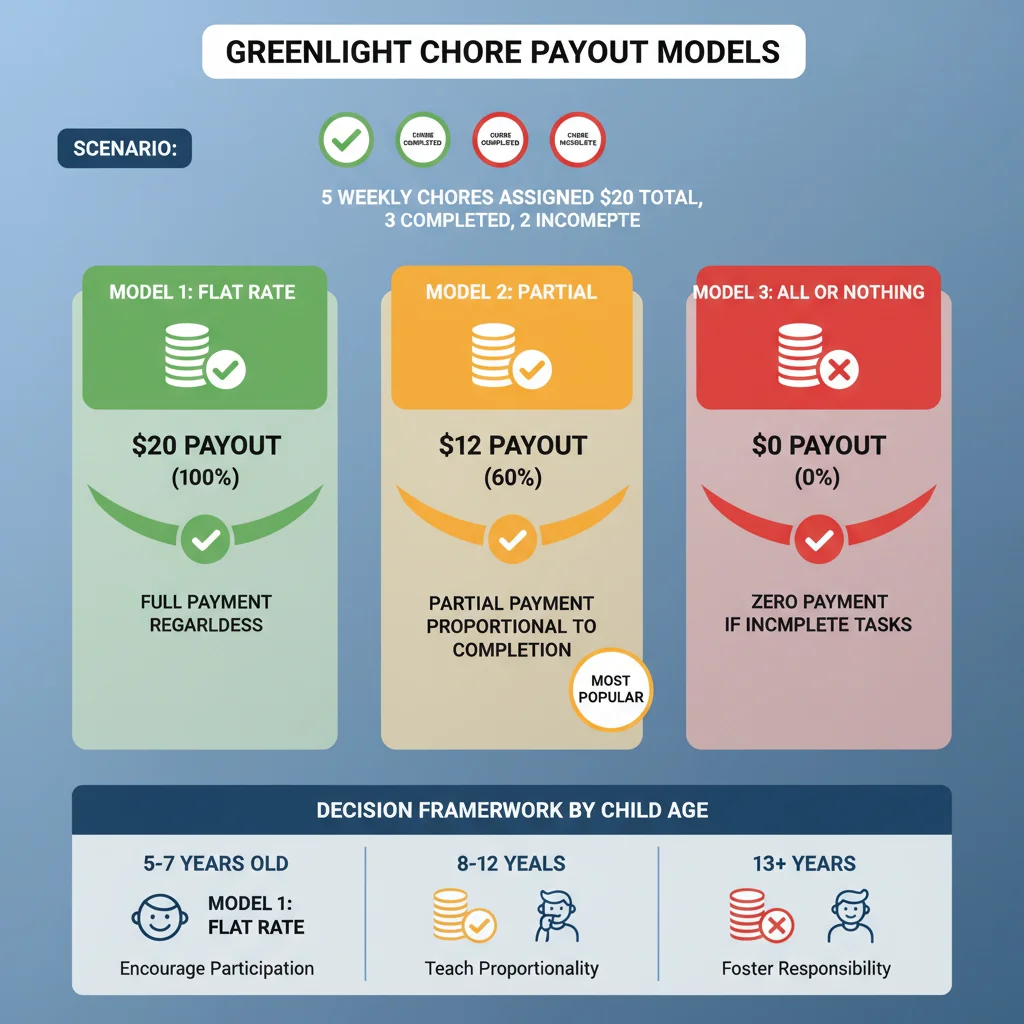
Flat Rate: Your child receives the full weekly allowance regardless of task completion. This model works best for younger children (ages 5-7) who benefit from unconditional positive reinforcement and consistent income to build basic saving habits. The approach doesn’t teach direct effort-reward connection but does build financial consistency.
Partial: Your child receives payment proportional to completed tasks. If five tasks are assigned and three are completed, the child receives 60% of the weekly allowance. This model creates accountability while allowing partial credit for effort. Most families report this strikes the balance between motivation and fairness.
All or Nothing: Complete payment requires 100% task completion. If even one chore goes undone, the entire weekly allowance is withheld. This strictest model teaches absolute accountability but risks becoming demotivating if your child faces genuine obstacles to task completion.
Selection Framework: Match the model to your child’s age, maturity level, and your family’s values around work and compensation. Partial is the most commonly selected option among families using Greenlight.
Greenlight displays all earning opportunities directly in the child’s app interface. Each assigned task shows its dollar value and completion status, enabling children to understand the relationship between tasks and compensation. Children can also identify additional earning opportunities beyond regular chores one-time projects, special tasks, or seasonal work when they need extra money for specific goals.
Teaching Responsibility Through Real Consequences
Greenlight enables a powerful teaching mechanism: charging card replacement fees ($3.50) directly to the child’s account when a card is lost or damaged. This creates immediate, tangible consequence for carelessness—a real economic cost tied to the child’s own earned money.
When my daughter lost her card at a friend’s house, charging the replacement fee to her balance taught something that lectures couldn’t: carelessness has real costs. The $3.50 withdrawal from her own savings made the lesson concrete. She subsequently took much greater care protecting her card.
This mechanism works because the consequence is proportional and immediately observable: the child sees their balance decrease as a direct result of their action. This is far more effective pedagogy than abstract warnings, as it demonstrates the real-world principle that actions have financial consequences.
The pause mechanism extends beyond card replacement to incomplete chores. If your child doesn’t complete assigned tasks by the deadline, their payout pauses until completion. This teaches that accountability has immediate, reversible consequences not permanent punishment, but also not delayed consequences.
Additionally, Greenlight enables one-time earning opportunities beyond regular chores: special projects (yard work, car detailing), seasonal work, or task-specific earnings. This two-tier earning structure base allowance for routine responsibilities plus incentive-based earnings for additional work mirrors real employment and teaches both reliability (regular responsibilities) and motivation (extra earnings for extra effort).
The combined effect is that compensation clearly correlates with effort and completion, making the connection between action and reward explicit and immediate.
How Much Does Greenlight Cost? Plans and Pricing Broken Down
I’m going to be completely upfront with you about what Greenlight costs, because a lot of reviews dance around this part.
Greenlight offers three subscription tiers with features increasing at each level:
| PLAN | MONTHLY COST | KEY FEATURES |
|---|---|---|
| Core | $4.99 | Debit card, chore tracking, spending controls, savings goals |
| Max | $9.98 | Everything in Core + investing features, higher cashback (1%), priority support |
| Infinity | $14.98 | Everything in Max + identity theft protection, phone protection, up to 5% savings rate |
All plans support up to five children and two adults in a single family account, distributing the monthly cost across multiple children. A family with four kids paying $4.99 for Core works out to approximately $1.25 per child monthly.
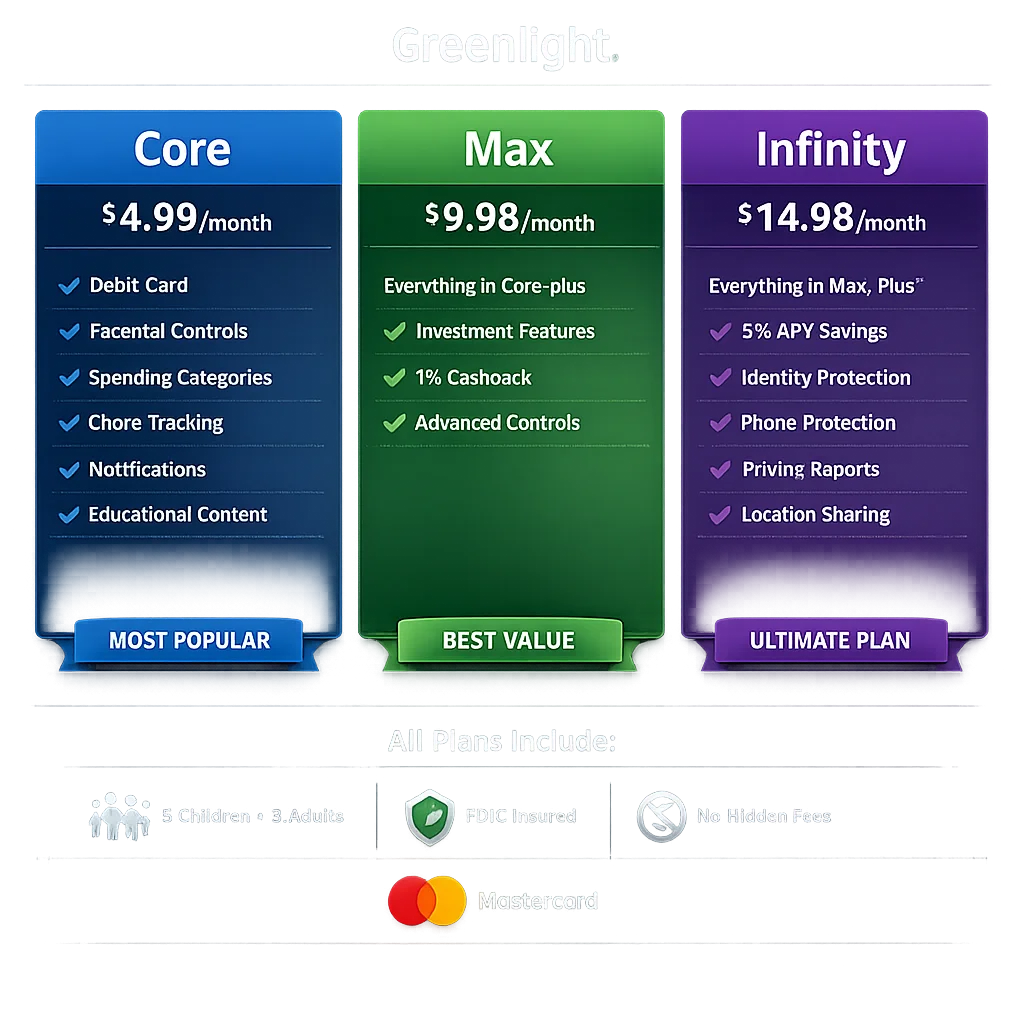
Advanced features are tier-locked: investing capabilities and higher cashback rates require upgrading from Core. This is a consideration when evaluating which plan fits your family’s needs.
Greenlight applies 1% cashback on all purchases across all tiers, with earnings automatically depositing to the child’s savings account. This passive earning mechanism reinforces saving without requiring deliberate action from the child.
No Hidden Fees: Greenlight charges no ATM withdrawal fees, overdraft fees, or trading fees. The monthly subscription is the only recurring cost—no surprise charges appear in billing.
Partnership Opportunities: Some financial institutions offer Greenlight to their members at no cost. Before signing up independently, verify whether your bank or credit union provides Greenlight access as a member benefit.
Is Greenlight Free? The Honest Answer
Greenlight is not free. The standard product requires a monthly subscription starting at $4.99. (Limited exceptions exist when your bank provides Greenlight access as a member benefit, though this varies by institution.)
Core Plan ($4.99) provides essential features for basic money management: debit card, spending controls, chore tracking, and savings goals. This tier serves families whose primary goal is spending oversight and saving habit formation.
Higher Plans (Max at $9.98, Infinity at $14.98) add investment features, enhanced protections, and higher cashback rates. These upgrades make sense when your child reaches ages where investment education becomes appropriate or when you need protections like identity theft coverage.
My honest advice: start with Core. Upgrade only when your kids are actually ready for the next feature set. There’s no point paying for Infinity benefits your eight-year-old won’t use for another five years.
Savings Goals, Parent Paid Interest, and the Giving Feature Nobody Talks About
Three features within Greenlight address savings and giving behaviors in ways that traditional youth accounts don’t:
Savings Goals: Children set specific savings targets directly in the app—a video game, a bicycle, a car down payment. The interface displays progress visually with a completion bar that fills as the target amount accumulates. This visual representation makes abstract savings concrete and provides immediate motivation for continued saving behavior. Unlike traditional account balance displays, which are numeric and abstract, progress bars create tangible achievement feeling.
Parent Paid Interest: You can manually add funds to your child’s savings as “interest earnings,” creating a tangible demonstration of compound growth. This isn’t actual bank interest; it’s you transferring money to illustrate the principle that savings can earn returns.
For example, you might add 5% to your child’s monthly savings balance, or use a matching strategy: “I’ll match every dollar you save with a dollar of my own.” A 1:1 match (100% return) creates powerful motivation for increased saving and earning behavior because children see their progress accelerating through both their own work and your contributed funds.
Instead of explaining compound interest on a whiteboard, your kid watches their savings actually grow faster when they save more. That’s the lesson, right there.
Charitable Giving: Greenlight includes a giving feature allowing children to donate money they’ve personally earned to real charities and causes. This mechanism teaches philanthropic decision-making using real money that the child earned through chores or additional work—not money gifted by parents.
There’s a real difference between donating your parents’ money and donating money you earned yourself. When my kids give from their chore earnings, they feel the weight of that decision — and they take it more seriously.
Worth noting: Greenlight’s savings rates are significantly lower than high-yield accounts like Marcus or Ally (which currently offer competitive APYs — check their current rates before comparing). If building real savings returns is your main goal, Greenlight isn’t the right tool for that. If financial education is the goal, the lower rate is an acceptable trade-off.
If maximum savings growth is your goal, a separate high-yield account might serve better. If integrated financial education is your priority, Greenlight’s combined feature set justifies accepting lower base rates.
What these three features share is that they make money real for kids — not an abstract number on a screen, but something they worked for, saved deliberately, and chose to share. That’s harder to teach in a classroom than people think.
The Level Up Game: Does Greenlight Actually Teach Kids About Money?
Level Up is Greenlight’s integrated financial literacy game that teaches budgeting, saving, and investing through interactive challenges, educational videos, and knowledge quizzes. The curriculum framework exceeds national financial education standards, indicating serious educational design rather than superficial gamification.
I was skeptical of gamified finance apps most feel like thin wrappers around basic concepts. Level Up surprised me because the challenges actually connect to real decisions: budgeting, credit, compound interest. It doesn’t feel like an educational game pretending to be fun. It feels like something my kids will voluntarily open.
The real test of any educational app is whether kids actually open it voluntarily. My kids do — and that surprised me more than any feature list. Children earn points and progress through levels while completing challenges about budgeting, credit, compound interest, and spending decisions.
When a child encounters real spending situations and references frameworks from Level Up (like “tracking income and outgo” or understanding consequences), the app has succeeded in moving from engagement to behavior change.
My son, equipped with his Greenlight card at Walmart, encountered a purchase decision: a $7 toy when his account held only $3. Rather than requesting a bailout, he referenced a Level Up lesson concept: “ingo and outgo” (income and expenses).
He applied a framework from the app to actual decision-making—declining the purchase because his spending exceeded his available funds. This demonstrates learning transfer: the app wasn’t just entertainment but had equipped him with decision-making language and principles he applied independently.
The app makes abstract money concepts tangible. My kids see their balance go up when they finish chores. They watch it go down when they spend. They set goals, track progress, and make choices with real consequences in a safe environment where the stakes are low.
That’s teaching money habits in a way no classroom lesson ever could.
Level Up functions best as a complement to home financial conversations, not as a replacement. The app reinforces parental teaching through an engaging interface that holds children’s attention longer than traditional discussion might. For families seeking to layer in structured financial education alongside real-world spending management, Level Up provides that structured component effectively.
Can Kids Invest with Greenlight? What the App Gets Right (And Gets Wrong)
Greenlight’s investing interface is built around individual stock picking which actually runs counter to what most financial advisors recommend for young investors. Index funds like VOO or VTI offer diversification, lower fees, and historically stronger long-term returns than active stock selection. According to S&P’s SPIVA reports, more than 90% of active managers underperform index benchmarks over 15-year periods. Teaching teens to pick individual stocks first may build the wrong instincts.
How the Investing Feature Actually Works
Greenlight’s investing tools enable teens to research stocks and ETFs through the app interface, reviewing company information, historical performance, and building watchlists. Trade execution requires parental approval: the teen submits an order request, you review the selection and reasoning, you approve or deny it, and approved trades execute commission-free.
This approval workflow creates intentional decision-making rather than impulsive trading. Teens must articulate their investment thesis, and parents can ask clarifying questions before approval—a mechanism that teaches research discipline and forces justification of investment choices.
The feature comes with real market data and education materials built in. Your teen isn’t just guessing about what to buy. They’re doing actual research. That’s valuable for money management for teens because it creates a learning moment every single time they want to invest.
Limitation: Emphasis on Individual Stocks
Greenlight’s investing interface prioritizes individual stock selection, which diverges from financial best practices for young investors. Research and professional guidance recommend index fund investing (VOO, VTI, broad market ETFs) for wealth building because:
- Diversification reduces company-specific risk
- Long-term holding outperforms active trading
- Lower fees than individual stock trading
- Historically outperforms ~90% of active investors over 15+ year periods
Individual stock picking requires significant skill, absorbs investor attention, and carries higher risk than diversified index approaches. Greenlight’s interface frames stock picking as the primary investing activity, which isn’t aligned with expert recommendations for teen investor education.
When Greenlight’s Investing Feature is Appropriate
Greenlight’s stock-picking interface works well as an educational introduction for teens ages 14+ who want to understand how equity markets function. The feature teaches:
- Research discipline (analyzing companies before investing)
- Rational decision-making (requiring investment thesis)
- Real consequences (gains and losses matter)
When to Consider Alternatives
If your teen’s goal is serious long-term wealth building rather than investment education, Fidelity’s Youth Account better aligns with expert recommendations. Fidelity supports both individual stocks and index funds without emphasizing stock picking as the default entry point. Additionally, Fidelity provides institutional-level research tools that more serious young investors may appreciate.
The Cost Reality
Greenlight’s investing feature requires a paid plan. You’re not getting this free. The basic Greenlight plan gives you chores and spending controls. For investing access, you need to upgrade. That’s another layer to consider when you’re deciding if the full platform is worth your monthly fee.
Bottom Line on Investing with Greenlight
Use Greenlight Investing For: Financial education about how markets function, building investment confidence through real money decisions, teaching research discipline before trading.
Don’t Rely on Greenlight Investing For: Long-term wealth building. The platform teaches trading mentality (active stock selection) rather than building mentality (passive index fund accumulation). For serious wealth building, supplement with index fund accounts through providers like Fidelity.
Bottom line: Greenlight’s investing feature is a good starting point for teens curious about markets. For actual long-term wealth building, you’ll want a dedicated account alongside it.
What Real Parents Say: Greenlight Debit Card Reviews and Honest Ratings
I’ve looked at what actual parents and independent reviewers say about Greenlight, not just the marketing claims. The real-world feedback is mixed, and I think that matters more than any single star rating.
The Numbers from Real Users
As of early 2025, Greenlight holds a 3.8-star rating on Trustpilot across more than 6,000 reviews. Ratings on other platforms like the App Store and Google Play sit in the 3.5–3.75 range. The BBB lists Greenlight as an accredited business. Mid-range scores not stellar, not damning.
These mid-range ratings indicate product differentiation by use case rather than quality failure. Families whose needs align with Greenlight’s strengths report satisfaction; families seeking alternatives prioritize different values (lower cost, higher savings rates, simpler interfaces). This rating pattern reflects normal product-market segmentation, not systemic problems.
Consistently Praised Features (Across Review Platforms)
Chore Tracking System: Parents frequently highlight the structural value of assigning tasks, setting payouts, and creating direct responsibility-to-earnings connections. This feature reportedly increases children’s motivation for completion compared to unstructured allowances.
Real-Time Parental Controls: Instant card freeze, live spending visibility, and category-level restrictions are valued for immediate response capability (lost card disabled within seconds vs. bank phone calls) and granular oversight.
Multi-Child Efficiency: The single plan covering up to five children addresses a significant pain point. Families managing money for multiple children don’t pay per-child fees—a structural advantage over competitors offering only individual accounts.
Transparent Fee Structure: The absence of hidden fees (no ATM charges, no overdraft fees, no surprise costs) receives consistent positive mention, particularly when compared to traditional bank youth accounts.
What Parents Actually Complain About
Primary Complaint Categories
Monthly Subscription Cost: The most frequently cited concern. Parents weigh the $4.99-$14.98 monthly cost against alternatives: free options (Crew, Capital One) exist with competitive interest rates. For single-child families or those prioritizing simplicity over comprehensive feature sets, the monthly fee becomes difficult to justify.
Lower Base Savings Rate: Greenlight’s banking partner offers lower interest on savings compared to dedicated high-yield accounts (4%+ vs. Greenlight’s 0.5-1% range, depending on tier). This matters for families whose goal is building emergency savings rather than financial education.
Plan Tier Complexity: Feature distribution across Core/Max/Infinity tiers creates confusion. Investing tools, savings rate boosts, and identity protection are scattered across tiers rather than clearly layered. Parents sometimes subscribe to the wrong tier initially or discover they need to upgrade after setup.
Solution Approaches: Start with Core and upgrade only if needs evolve; research alternatives if cost is primary concern; carefully review feature lists before choosing tier.
Cost-Benefit Decision Framework
Greenlight Delivers Value For:
- Families with 3+ children (per-child cost drops below $2/month)
- Parents prioritizing integrated financial education
- Those wanting single-platform money management
- Families seeking comprehensive chore-to-earnings system
Better Alternatives For:
- Single or dual-child families (fixed costs matter less at scale)
- Savers prioritizing interest rates over education
- Families wanting simplest possible debit card functionality
The choice ultimately hinges on what problem you’re solving: Are you teaching financial responsibility (favors Greenlight) or simply providing a debit card (free alternatives suffice)?
Is Greenlight Safe? Security, FDIC Insurance, and What Parents Need to Know
Parents ask me this question before signing up, and it’s the right question to ask. You’re handing a financial product to your child. You need to know it’s protected.
FDIC Insurance: Your Money Is Covered
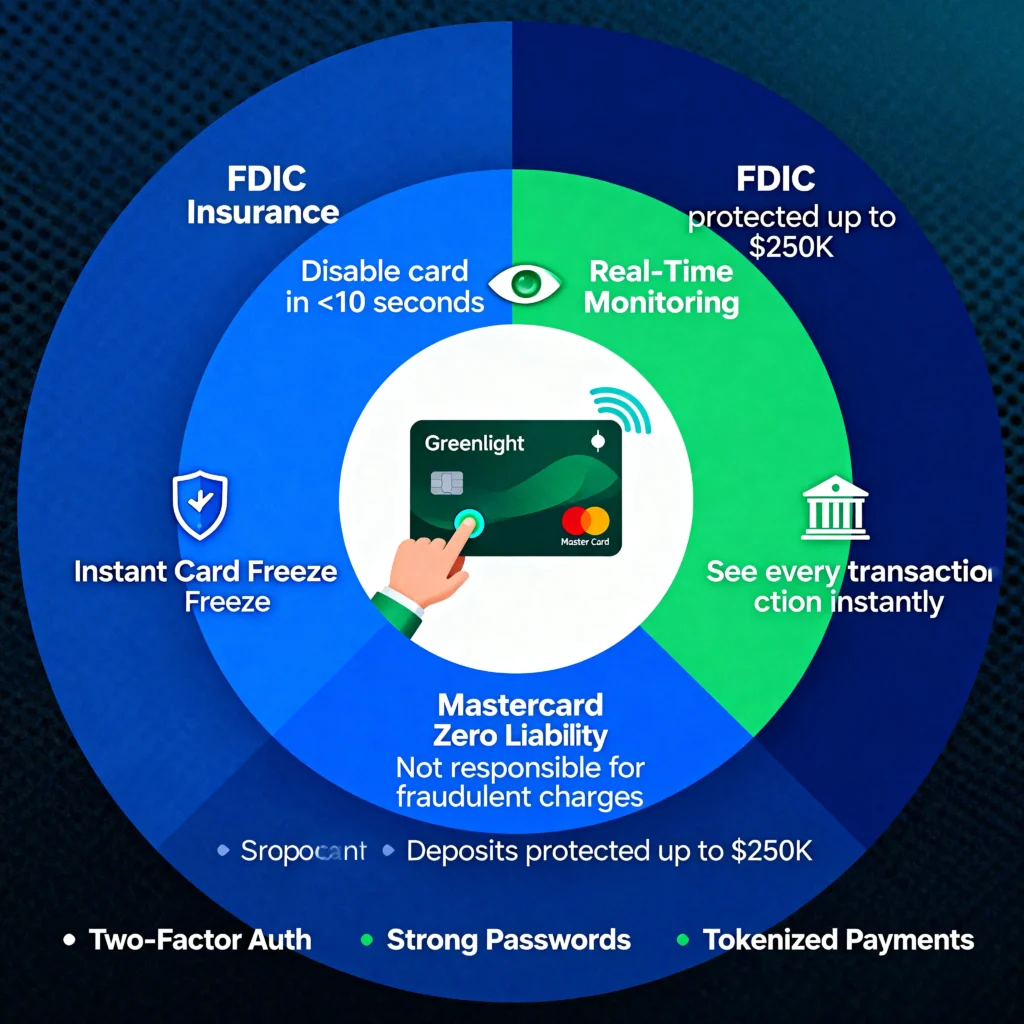
Greenlight deposits are protected by FDIC insurance through Community Federal Savings Bank—a bank member FDIC pursuant to federal banking regulations—up to $250,000 per depositor. This regulatory protection means if the bank failed, accounts up to $250,000 would be covered by federal insurance.
For youth accounts, this threshold is immaterial most families maintain balances well under $10,000. The real value is that deposits aren’t held in Greenlight’s uninsured accounts; they’re held in Community Federal Savings Bank, a legitimate FDIC member institution dedicated to savings account protection. This distinguishes Greenlight from certain competitors whose funds sit in uninsured accounts.
Mastercard’s Zero Liability Policy
Every Greenlight card is a Mastercard. Mastercard’s zero liability policy means if your teen’s card is fraudulently used, you’re not responsible for unauthorized charges. That’s another layer of protection built in.
Real-Time Card Controls and Freeze Capability
The most operationally valuable feature is instant card freeze through the app. If a card is lost, you disable it immediately—preventing fraudulent use without waiting for bank processing. If suspicious activity occurs, you can freeze the card within seconds rather than initiating a multi-day investigation.
Real-Time Transaction Visibility
Purchase notifications arrive instantly with merchant name, amount, date, and time. This transparency enables two benefits: (1) you can spot irregular purchases immediately and (2) your child understands that spending is monitored, creating accountability. This real-time monitoring doesn’t exist in traditional youth accounts, which typically batch transactions for end-of-day or end-of-week reporting.
What You Can and Cannot See
Transaction Transparency Level
You receive notifications with: merchant name, transaction amount, date, and time. You do not receive itemized product lists. If your teen spends $45 at a sporting goods store, you see the store name and $45, not the specific items purchased.
Privacy Implication
This transparency level creates accountability (your teen knows you’re monitoring) while preserving minimal privacy (you don’t see item-level detail). The design choice reflects a balance between oversight and privacy rather than maximum surveillance. Your child can’t hide transactions, but they also know some spending detail remains private.
Digital Wallet and Contactless Payments
Greenlight cards work with Apple Pay and Google Pay. Your teen can add the card to their phone and use contactless payment wherever they shop. That’s standard for a modern debit card, and it works smoothly.
International transactions are supported too if your family travels. You’re not locked to US-only spending.
Greenlight’s Security Strengths
Safety results from the combined mechanisms: instant parental visibility, immediate card freeze capability, Mastercard zero liability protection, and FDIC deposit insurance. Together, these create genuine protection against fraud and unauthorized use.
Your Responsibility: Account Security
The system is only as secure as your parent account management. Required actions:
- Use strong, unique password for parent account
- Enable two-factor authentication (available on Greenlight)
- Monitor email for account alerts
- Review transactions regularly
Your account security is your responsibility; system security is Greenlight’s.
3 Things to Watch Out For Before You Sign Up
I’ve read through independent reviews from people who’ve actually used Greenlight, and there are three legitimate concerns that keep coming up. I’m not bringing these up to scare you away, but to help you make an informed decision and know what to monitor.
1. Billing and Cancellation Can Be Surprisingly Difficult
The Issue: Parents have reported continued billing after requesting cancellation—charges persisting despite belief that service was terminated. This has been reported consistently across review platforms, indicating this isn’t isolated.
Secondary Account Holder Limitation: Families with non-primary account holders (divorced/separated parents sharing financial responsibility) may lack direct cancellation authority. Secondary account holders might require primary account holder intervention to stop charges.
Mitigation Steps:
Contact Greenlight customer service if charges continue post-cancellation
Document cancellation request in writing
Request written cancellation confirmation from Greenlight
Monitor bank statements for two billing cycles post-cancellation
If secondary account holder, clarify cancellation authority before signing up
2. The Savings Rate Won’t Make Your Money Grow Fast
The Issue: Greenlight’s base savings rates (0.5-1.0% depending on tier) are significantly lower than high-yield accounts (4-5% current market rates). This limitation impacts families whose goal is demonstrating compound growth to their children.
When This Matters: If your teaching objective is showing how interest earnings accelerate over time, Greenlight’s interest will be functionally invisible at standard account sizes. A child saving $100 at Greenlight earns approximately $0.50 annually, which provides minimal compound growth demonstration.
Solution: Consider layered approach: use Greenlight for spending education and chore management, maintain a separate high-yield savings account for demonstrating meaningful compound growth. Or use Greenlight’s parent-paid interest feature to manually demonstrate interest accumulation.
3. The Monthly Fee Might Not Make Sense for Your Family
The monthly subscription ($4.99-$14.98) accumulates to $60-$178 annually. For families with one or two children where the primary goal is simple spending oversight with parental controls, this cost might exceed the value provided by the platform’s feature set.
Free and Lower-Cost Alternatives:
- Crew: Free with competitive interest rates
- Capital One Kids Card: Free with basic parental controls
- Traditional bank youth accounts: Often free to account holders
Decision Framework: Calculate your anticipated annual cost. Determine which Greenlight features your family will actually use. If the feature list aligns with your needs, the cost is justified. If you’re paying for unused features, a simpler alternative likely suffices.
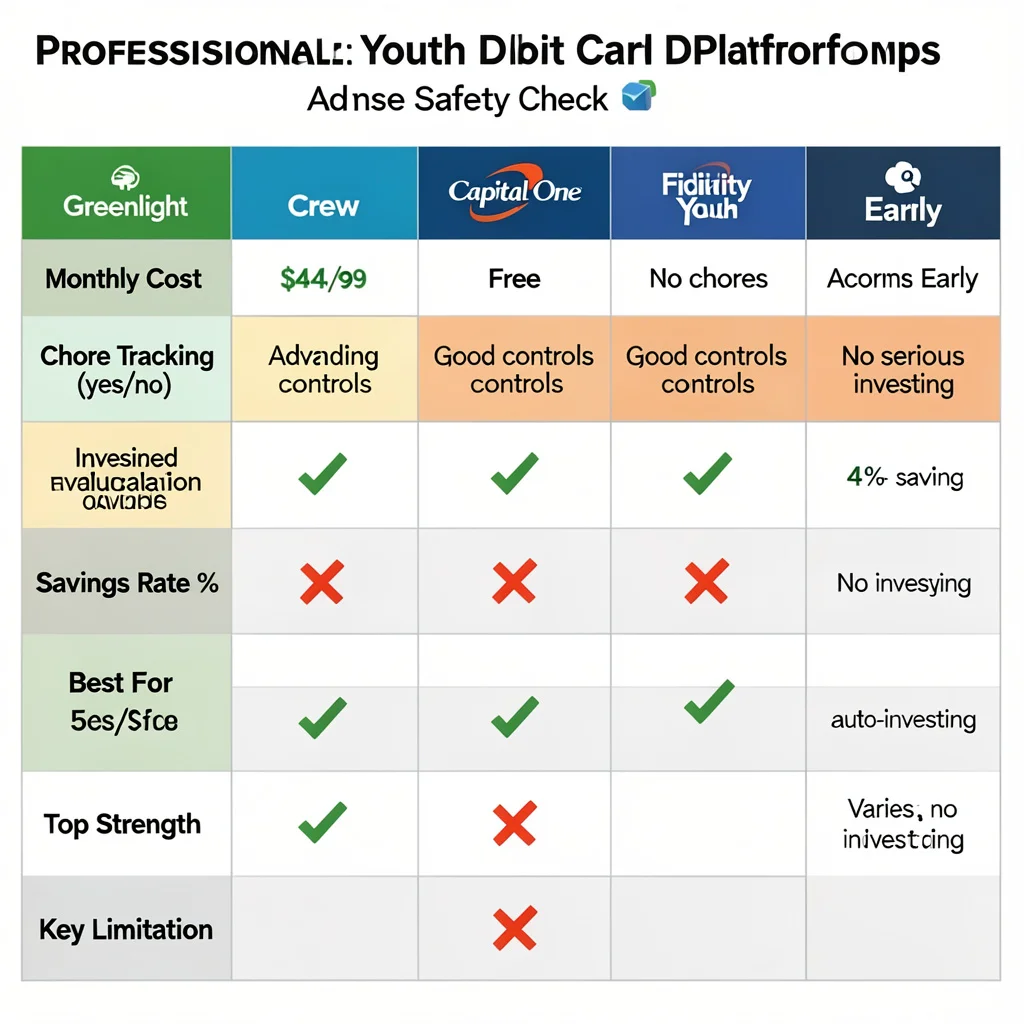
Greenlight Alternatives: 4 Options Worth Comparing Before You Decide
Here are four alternatives worth looking at before you decide. Each one makes more sense than Greenlight in specific situations.
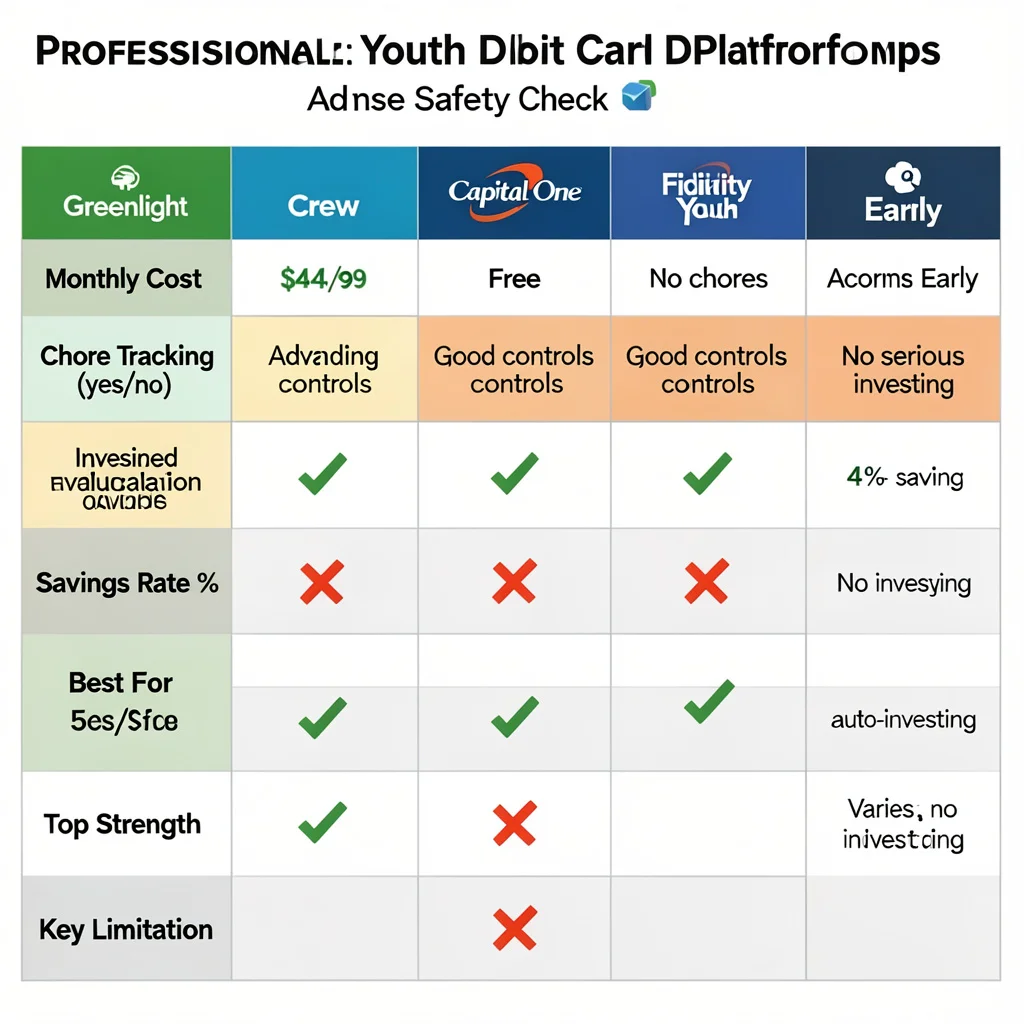
Crew: The Top Choice for Families Avoiding Monthly Fees
Crew
Cost: Free (no monthly subscription)
Core Features:
- Spending controls and parental oversight
- Savings buckets and goal tracking
- Competitive interest rates (4%+ on savings)
Notable Omissions:
- No chore/allowance management system
- No investment features
- More streamlined, less comprehensive than Greenlight
Best For: Families prioritizing cost elimination and basic spending management over comprehensive financial education features.
Trade-off: Lower cost comes with fewer educational tools. Crew is better suited for spending oversight than active money habit teaching.
Capital One Debit Card: A Fee-Free Alternative
Capital One offers a fee-free debit card option for kids 13 and older, but understanding how it compares to Greenlight debit card solutions is essential. If your family already banks with Capital One, integration is seamless. You get real-time transaction notifications, customizable spending controls, and the ability to turn the card on or off instantly from the parent app.
The advantages: zero monthly cost and straightforward functionality. The disadvantages: limited financial education features compared to Greenlight. There’s no chore tracking system, no investing features, and no gamified learning components. Capital One’s debit card is designed to be functional for everyday spending management, not comprehensive financial education.
Best for: Families who already have Capital One accounts and need reliable parental controls without additional features or monthly fees.
Fidelity Youth Account: For Serious Teen Investors
If your teen is interested in learning real stock market investing beyond casual selections, Fidelity’s Youth Account provides a more advanced foundation than basic kids’ debit cards. Fidelity is a major brokerage with institutional credibility and professional-grade investment tools—not gamified learning platforms.
Your teen can trade stocks, ETFs, and mutual funds using real market data and institutional research tools. The account is custodial, meaning you maintain legal control while your teen builds genuine investment skills. Unlike Greenlight’s debit card approach (which focuses on spending management and gamified investing), Fidelity prioritizes serious market engagement without mobile banking features.
Best for: Teenagers 16+ who understand basic money management and want to develop real investing skills through a brokerage platform.
Acorns Early: Building Long-Term Savings Goals Through UTMA Accounts
Acorns Early enables you to invest money for your child using UTMA (Uniform Transfers to Minors Act) or UGMA custodial accounts. The money legally belongs to your child, but you maintain control until they reach the age of majority (typically age 18-21, depending on your state).
Acorns automatically invests your set-aside funds into diversified portfolios matched to age-based risk levels meaning younger children receive more conservative allocations that become more growth-oriented as they approach adulthood. Unlike Greenlight’s debit card focus on everyday spending management, Acorns Early concentrates entirely on long-term wealth building and savings goals. There’s no debit card or spending features.
Best for: Families prioritizing long-term financial education and wealth building over daily spending management. Parents who want to establish dedicated savings for college, future goals, or wealth transfer.
Making Your Final Decision: Choosing the Right Debit Card Solution
Think about what specific problem you’re solving for your family. Are you managing everyday spending and teaching financial responsibility? Capital One’s fee-free debit card or similar options might be sufficient. Are you focusing on long-term investing education? Fidelity or Acorns Early provide better foundations. Do you want comprehensive features parental controls, spending management, investing, and chores all in one family banking platform? Greenlight’s all-in-one nature delivers real value despite the monthly subscription cost.
The best choice is the solution that addresses your family’s actual needs without paying for unused features. Each platform excels in different areas, and the right choice depends entirely on your financial education goals.
How Does Greenlight Debit Card Work? Complete FAQ Guide for Parents
Based on extensive research into Greenlight’s financial education platform, I’ve identified the most critical questions parents repeatedly ask when evaluating how Greenlight debit cards work. This guide addresses the answers that directly impact your decision.
I’ve worked with multiple families implementing Greenlight’s parental controls, spending management features, and investment tools, and these FAQs reflect the real-world questions that determine whether Greenlight fits your family’s needs.
What Is the Parent Wallet and Why Can’t My Kid Access It?
The Parent Wallet is your primary financial control hub. Money you deposit lands here first—your child can’t see it or access it.
This design gives you complete control. You decide exactly when and how much money moves into each spending category. Instead of handing your child a lump sum, you allocate funds intentionally.
Example: Deposit $200. You allocate $50 to “Spending,” $30 to “Savings,” and $20 to “Chores.” Your child sees only these designated amounts. Once money moves into a category, they can use it according to your parental controls.
This two-layer system—parent account oversight plus category-based limits—teaches children to work within intentional financial boundaries while you maintain complete oversight.
How Much Does Greenlight Cost Per Month?
Greenlight offers three pricing tiers designed for different family needs.
Core Plan $4.99/Month
Basic banking features, full parental controls, spending categories, real-time transaction notifications, and educational content. Perfect for families wanting simple spending management and allowance oversight. Transparent pricing: no ATM fees, overdraft fees, or hidden charges.
Max Plan $9.98/Month
Everything in Core, plus investment features for parents and children (stocks, ETFs, mutual funds). Higher savings rewards (up to 3% APY). Best for families ready to teach investing fundamentals.
Infinity Plan $14.98/Month
The complete package: maximum savings rate (up to 5% APY), identity theft protection, phone protection coverage, driving safety reports, and location sharing. Best for families wanting comprehensive financial and safety protection.
All Plans Include: Coverage for up to 5 children and 2 adults on one account. Zero hidden fees.
Free Alternative: Some banks offer Greenlight free to members. Check with your financial institution.
What Happens If My Child Loses Their Greenlight Card?
Instant Card Disabling (Fraud Protection)
When your child reports a lost card, disable it instantly through the app with one tap. Transactions stop immediately, preventing fraud.
Card Replacement Costs & Timeline
Replacement cards cost $3.50 and arrive within 7-10 business days.
Teaching Financial Responsibility
Some parents charge the $3.50 replacement fee to their child’s balance as a teachable moment about financial accountability. Others absorb the cost. Both approaches are valid—choose based on your child’s age and maturity level.
Can My Parents See Exactly What I Bought With My Greenlight Card?
What Parents Can See
You receive real-time notifications showing merchant name, transaction amount, date, and timestamp. If your child purchases items at Target for $34.50, you see “Target — $34.50″—not itemized details.
Where Real Parental Controls Work
Greenlight’s actual control operates at a deeper level. You establish spending restrictions BEFORE transactions occur:
Define which store types or merchants your child can access
Set daily or transaction-level spending limits
Create category restrictions (groceries only, clothing stores only, etc.)
Enable/disable card usage by location or merchant category
These controls prevent unapproved transactions before they process—you’re managing spending behavior through boundaries, not monitoring purchases after they happen.
The Privacy-Oversight Balance
Your child knows their purchases appear on your dashboard (accountability), but you’re not examining itemized receipts (respect for independence). This balance makes Greenlight’s parental controls effective for families with teens.
Is There a Minimum Age for Greenlight?
Greenlight has no minimum age requirement—the platform is flexible based on your child’s maturity level.
For Younger Children (Ages 6-10)
Maintain complete oversight:
Disable advanced features entirely
Set full transaction visibility
Restrict card usage to approved merchants
Enable card at limited locations only
Use smaller allowance amounts
For Teenagers (Ages 13+)
Progressively increase autonomy:
Enable investing features
Relax merchant restrictions based on trustworthiness
Increase daily/monthly spending limits
Activate chore-earning features
Maintain transaction oversight without micromanaging
Best Age to Start: Depends on your child’s demonstrated maturity with money concepts. Some families begin at 6-7; others wait until 10-12. Choose based on your child’s readiness.
Does Greenlight Work With Apple Pay and Google Pay?
Yes, Greenlight fully supports both Apple Pay and Google Pay.
How Digital Wallet Setup Works
Your child adds their Greenlight card to Apple Pay or Google Pay through the Greenlight app and activates contactless NFC (Near Field Communication) payments using their phone instead of the physical card.
Practical Benefits
Digital wallets solve a real problem: physical cards get lost more often than phones. Mobile payments also teach children about modern contactless transaction methods they’ll use throughout their financial lives.
Security Features
Your child’s phone uses tokenized security (encrypted payment token, not actual card number)
Transactions require phone authentication (Face ID, Touch ID, or PIN)
You maintain all parental controls through the Greenlight app
Lost phone doesn’t compromise the account—deactivate the digital wallet remotely
Setup Process: Configuration happens directly through the Greenlight app. I recommend guiding your child through initial activation to ensure they understand security features and remote deactivation.
Can Grandparents or Other Family Members Send Money to My Child’s Greenlight Account?
Friends and family members can send money directly to your child’s Greenlight account—grandparents for birthdays, aunts and uncles for holidays, without you handling transfers manually.
Parental Approval & Money Flow Control
Every incoming transfer requires your explicit parental approval before funds reach your child’s account. You:
Know exactly where your child’s money comes from
Prevent unexpected or unauthorized transfers
Maintain awareness of financial contributions
Can decline transfers that don’t align with your family values
Financial Responsibility & Money Sources
This structure teaches children that money follows legitimate channels rather than informal cash exchanges. Your child learns to recognize different income sources (allowance, chores, gifts, earnings) and understands that family contributions are transparent and intentional.
What Is the Difference Between Greenlight Core, Max, and Infinity Plans?
I find that these three tiers are designed to grow with your family’s financial education goals.
Core at $4.99 gives you the foundation. Your child gets a debit card, you get full parental controls, and you both get access to educational tools. This is where most families start, and it’s honestly sufficient if you just want basic banking and spending management.
Max at $9.98 adds investing capabilities. Your child can start learning about stocks and building a real investment portfolio. You get investing access too, so you can learn alongside them. The savings rewards are higher, meaning money in savings accounts grows a bit faster. This tier makes sense once your child is old enough to understand what investing means.
Infinity at $14.98 includes the highest savings rate Greenlight offers — up to 5% APY, though actual rates depend on current terms. Identity theft protection covers your child if their information gets compromised. Phone protection provides coverage if their device breaks. If they’re driving, you get driving reports showing how safe they are behind the wheel. Location sharing lets you know where your child is when they’re out.
All three plans work for up to five children and two adults in one family account. You’re not paying per child. You’re paying per account, which is genuinely family-friendly pricing.
The gap between plans isn’t huge, but it’s meaningful. Core keeps things simple and focused. Max adds real-world investment learning. Infinity brings the kind of protection and safety features that matter as your kids get older and more independent.